# How to Obtain Headers from Email
Below are step-by-step instructions for displaying email header information within several email apps.
## Gmail
1. In Gmail, click on the email you would like to view headers for.
2. Click the three-dot three-dot icon icon next to the **Reply** button.
3. Select **Show Original**.
Show Original
## Mac Mail
1. Open the email.
2. Click on the **View** menu on the Menu Bar.
3. Select **Message**, then **Long Headers**.
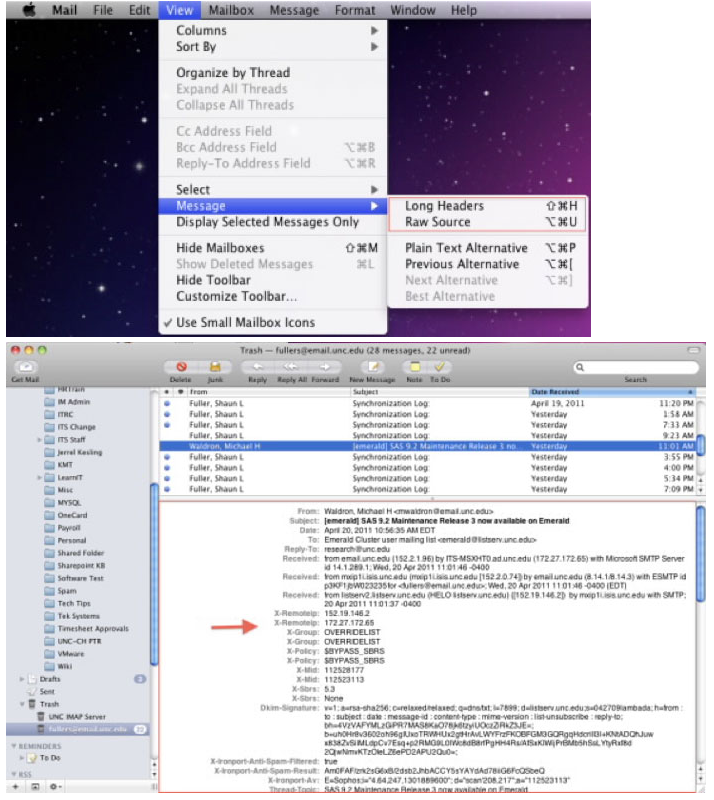Selecting Long Heading from the Message drop-down in the View menu.
## Outlook 2011
1. Right-click on the email that you would like to view the headers for (or use Shift +Click)
2. Click **View Source**.
3. This will open a text file with the Header Information outlook source code.
## Outlook 2010
1. Open the email.
2. Click the **File** Tab.
3. Select **Properties**.
4. The information will be listed under the **Internet Headers** section out look properties.
## Outlook 2007
1. Right-click the email (or use Shift + Click).
2. Choose **Message** from the menu.
3. The information will be listed under the **Internet Headers** Section outlook message options.
## Thunderbird
1. Select the email.
2. Click on **View**.
3. Click on **Headers**.
4. Click on **All**.
5. Click the “Forward” button and all header information will appear at the top of the email.