MacOS
Getting Started
If you're new to macOS, there are many resources available to help you get started. You can use the built-in Help menu in any application to find answers or visit the CCA Wiki for specific guides and tips.
Shortcuts
MacBook Keyboard Shortcuts
This page provides a quick and easy reference for essential MacBook keyboard shortcuts. Whether you're a new Mac user or just need a reminder, these shortcuts will help you save time and navigate your computer more efficiently.
-
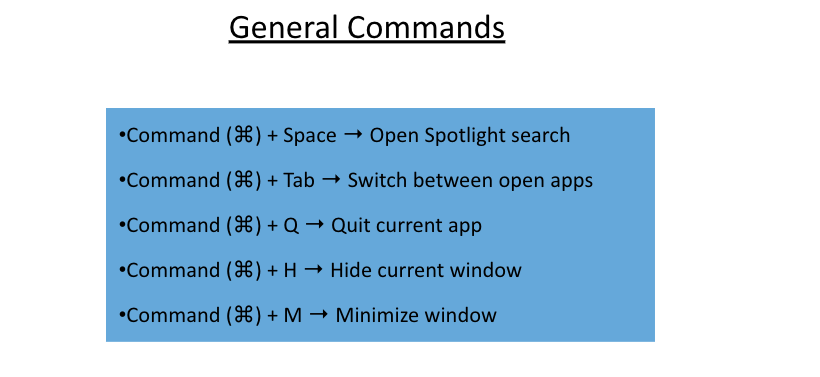
General Commands: Learn shortcuts for common actions like searching, switching between apps, and hiding or minimizing windows.
-
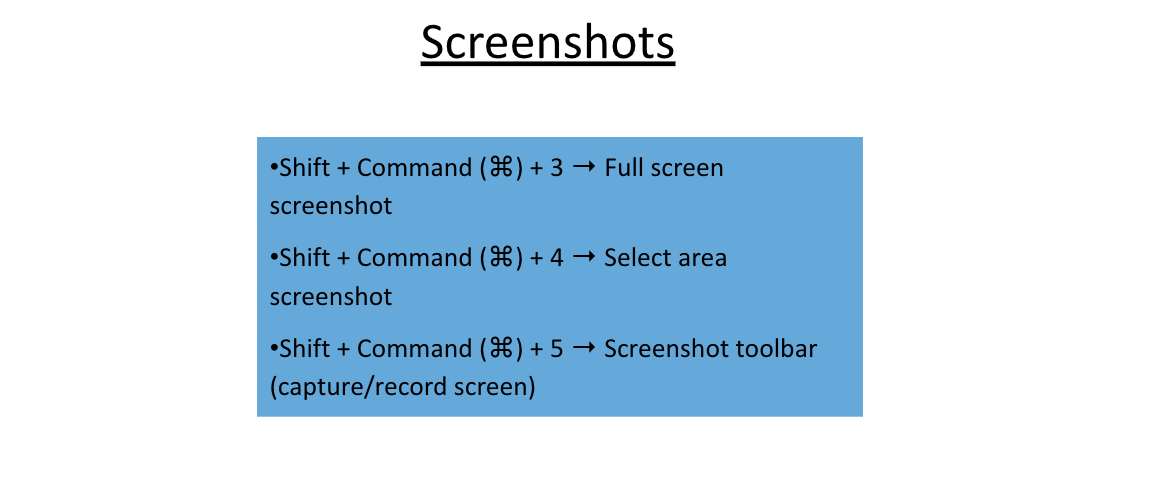
Screenshots: Discover how to take full-screen, partial, and custom screenshots, as well as how to record your screen with a simple shortcut.
Using these shortcuts can streamline your workflow and make daily tasks on your MacBook faster and more productive.